mainbhionline › Doctor appointment booking
Doctor appointment booking for your clinic
Patients scan your QR code or tap your link, pick a free time and book. You see every appointment on one screen and confirm it in one tap, and the patient follows its status live. No app or software to install.
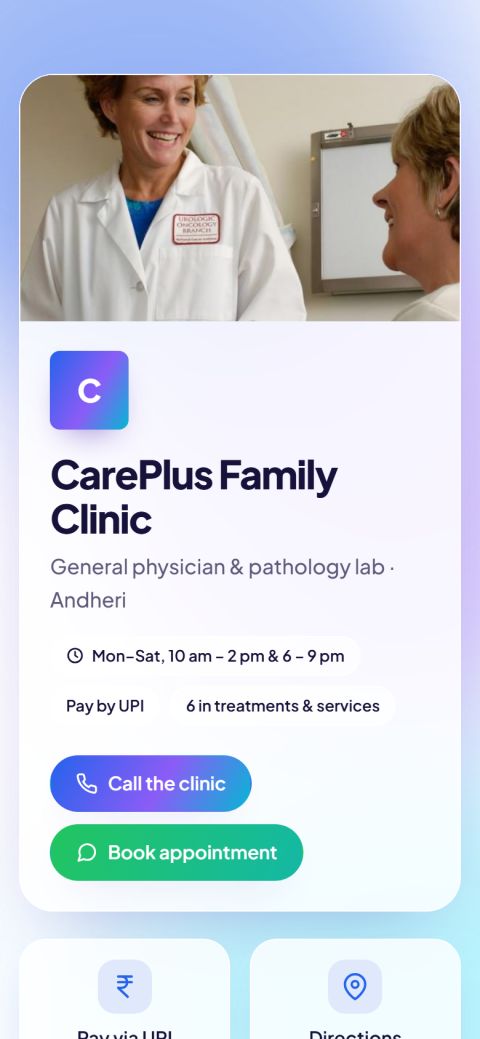
Online appointment booking in 3 taps
Your clinic’s card has a “Book appointment” button. Patients open it from the QR code at reception, your WhatsApp link or your Google profile.
Pick a date & time
Only free slots are shown, up to 30 days ahead. Full slots can’t be booked twice.
Enter name & mobile
Patients choose “At the clinic” or a home visit, if you offer one, and can add a short note.
Follow it live
They get a link that shows each step: confirmed, with the doctor, done. They can cancel from it too.
A simple doctor appointment system you control
Set it up once in your dashboard. Change it any time from your phone.
Your timings
Opening and closing time, closed days and slot length, like 15 or 30 minutes per patient.
Patients per slot
Choose how many patients can book the same time, for example 2 when two doctors sit.
New booking alerts
A sound on your bookings screen and an email for every new appointment.
One-tap status
Confirm, “With the doctor”, done or no-show. The patient sees each change on their link.
Today’s list
All of today’s appointments in time order, for the doctor or the reception desk.
Easy cancellations
Patients can cancel up to an hour before; the slot opens up again for someone else.
Fees & UPI
List consultation fees and services on your card. Patients pay at the clinic or by UPI.
Patient reviews
Ratings from real patients on your card, with your replies.
Why clinics move appointments online
| Appointments by phone | Online booking | |
|---|---|---|
| When patients can book | Only when someone answers | Any time, day or night |
| During consultations | Phone keeps ringing | Bookings arrive quietly on screen |
| Double bookings | Easy to make in a register | A full slot can’t be booked |
| Patient knows their status | Has to call and ask | Live status link |
| Cancellations | Often no call at all | One tap, slot freed for others |
For clinics and health practices of every kind
Bookings come straight to you. It’s your own booking page, not a listing among other doctors, and there’s no commission per appointment.
What does it cost?
Online appointment booking is part of the Standard plan at ₹999 a year (about ₹83 a month), and of Premium and Business. Prices include GST and there’s no fee per booking. Every plan starts with a 14-day free trial with no payment details. Compare plans.
See it as a patient would: open the CarePlus Family Clinic sample card and tap “Book appointment”.
Questions about doctor appointment booking
How do patients book an appointment with my clinic online?
They open your clinic’s card by scanning your QR code or tapping your link, tap “Book appointment”, pick a free date and time and enter their name and mobile number. You get an alert, and they get a link to follow the booking.
Do patients need to download an app?
No. Your booking page opens in the phone’s normal browser on Android and iPhone. You run the bookings from your browser too.
Can I set my own timings and slot length?
Yes. Set opening and closing times, closed days, how long each slot is and how many patients can book the same slot. Bookings can be made up to 30 days ahead.
Can two doctors take bookings?
You can allow more than one patient per slot, for example 2 when two doctors sit at the same time. A separate calendar for each doctor is not available yet.
How will I know about a new appointment?
Your bookings screen plays a sound when an appointment comes in, and you also get an email. One tap confirms it and the patient sees the update straight away.
How much does a doctor appointment booking system cost here?
Appointment booking is on the Standard plan at ₹999 a year (about ₹83 a month) including GST, with no commission per booking. Try it free for 14 days first.
Start taking appointments online
Free for 14 days, no payment details needed. Your card link and QR code are ready in about 2 minutes.