mainbhionline › Restaurant table booking
Restaurant table booking, without the commission
Let guests reserve a table from your restaurant’s own page. They choose a date, time and party size; you get an alert, confirm it in one tap and mark them seated when they arrive.
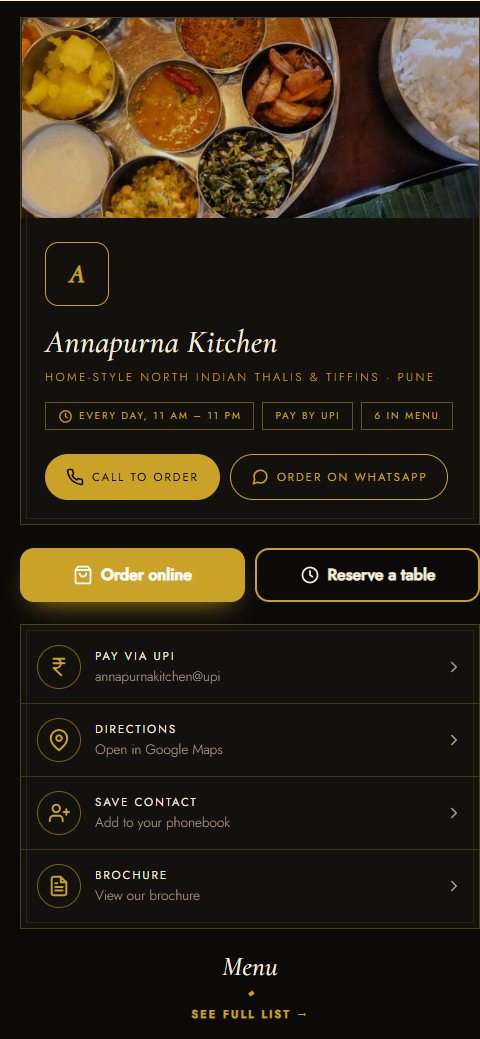
Table reservation in under a minute
Your card has a “Reserve a table” button. Guests reach it from your QR code, Instagram bio, WhatsApp or Google profile.
Pick date, time & people
Only times with a free table are shown, up to 30 days ahead.
Name & mobile
No sign-up or app. They can add a note, like “birthday” or “window seat”.
Live status link
They see when it’s confirmed, and can cancel up to an hour before.
A table reservation system you control
Tables per time slot
Set how many tables can be booked for each time, so you’re never overbooked.
Your hours
Opening and closing time, slot length, closed days, and late nights past midnight.
Party size limit
Set the largest group that can book online; bigger groups call you.
Booking alerts
A sound on your screen and an email for every new reservation.
Seated, done, no-show
Move each booking along in one tap. No-shows and cancellations free the table again.
Order online too
The same card takes takeaway, delivery and dine-in orders, paid by UPI or cash.
Why not only use a booking app?
Listing apps bring new guests. Your own page keeps your regulars coming straight to you.
| Listing & booking apps | Your mainbhionline page | |
|---|---|---|
| Cost | Often a fee or commission per guest or bill | Fixed yearly plan, no commission |
| What guests see | Other restaurants next to yours | Only your restaurant |
| Guest details | Depends on the app | Name and mobile come to you |
| Menu, orders & UPI | Separate apps | All on the same card |
What does it cost?
Table booking is on the Standard plan at ₹999 a year (about ₹83 a month) and above, including GST, with no fee per booking. Every plan starts with a 14-day free trial. Compare plans.
Try it as a guest: open the Annapurna Kitchen sample card and tap “Reserve a table”.
Questions about restaurant table booking
How do guests book a table at my restaurant online?
They open your card from your QR code or link, tap “Reserve a table”, pick a date, time and number of people, and enter their name and mobile. You get an alert and confirm it in one tap.
Can I stop too many bookings for the same time?
Yes. Set how many tables can be booked per time slot. When they’re taken, that time disappears for other guests.
Do guests need to download a table booking app?
No. Booking works in the phone’s browser, and so does your side of it.
Can guests cancel?
Yes, from their booking link, up to an hour before. The table becomes free for someone else straight away.
Do you charge per booking or per guest?
No. You pay a fixed yearly plan (Standard ₹999 a year) and take as many bookings as you like.
Start taking table bookings
Free for 14 days, no payment details needed. Your card link and QR code are ready in about 2 minutes.